
Give us some info for your personalized offer
If you’re running an email campaign for the first time, there is a high chance that the results were not as good as you were expecting.
You might have wondered why your emails remain unanswered. Or, why do your emails keep going to spam?
Don’t worry. You’re not alone. We’ve been there too. If you want to know how to keep your emails out of the spam folder, you’re in the right place. In this guide, you’ll learn:
- What the spam folder is
- Why emails land in the spam folder
- Signs that your emails are going to spam
- Our best tips to prevent your emails from ending up in spam
Let’s start!
What is the Spam Folder?
A spam folder, also known as a junk folder, is the place in your email account where you can see unwanted emails that did not manage to reach your inbox and are flagged as spam by email service providers (ESPs).
These filtering systems help users as they significantly decrease the number of unnecessary and promotional emails that people receive on a daily basis.
Every time you send a message, email service providers (ESPs) examine the reputation of your email address and your email content. If there is something suspicious about your emails, ESPs automatically block your email. As a result, it does not reach the targeted inbox.
However, that’s not the only reason emails end up in a spam folder. Let’s take a closer look at what else might be causing it.
Why Do Emails Go to the Spam Folder?
Below, you can find other common reasons why emails go to spam instead of the inbox.
Poor Email Authentication
Another common reason why your emails end up in a spam folder is poor email authentication. It is a process that is used to verify that emails are not forged or faked.
If you are an SEO specialist, link building outreach is an integral part of your job. However, if your email authentication measures are not properly set up, your outreach efforts may be in vain, as your emails could be flagged as spam.
It’s quite easy for spammers and phishers to send emails on behalf of your company. This is where email authentication comes in handy to stop scammers from using your domain without your consent.
There are three main types of email authentication to know:
- SPF (Sender Policy Framework): Verifies that your domain is sending emails from approved servers.
- DKIM (DomainKeys Identified Mail): A DKIM signature confirms that the email wasn’t modified after being sent.
- DMARC (Domain-based Message Authentication, Reporting & Conformance): Builds on SPF and DKIM, setting clear policies to help receiving servers decide how to handle unauthenticated emails.
If these protocols aren’t set up correctly, your emails may end up in the spam folder instead of someone’s inbox, no matter how good your template is.
Poor Domain Reputation
Spam filters also pay attention to domain reputation when scoring your emails.
Your domain reputation reflects how trustworthy your domain (e.g., yourcompany.com) is based on past sending behavior. If your domain has been associated with spammy or irrelevant emails, its reputation drops.
To check your reputation, we recommend using Google Postmaster Tools. It provides valuable insights on the overall health and deliverability of your email campaigns, as well as details about how often your emails are being marked as spam by users.
For example, in the screenshot below, you can see that the spam complaint rate reached 4.8%, which signals a deliverability issue.
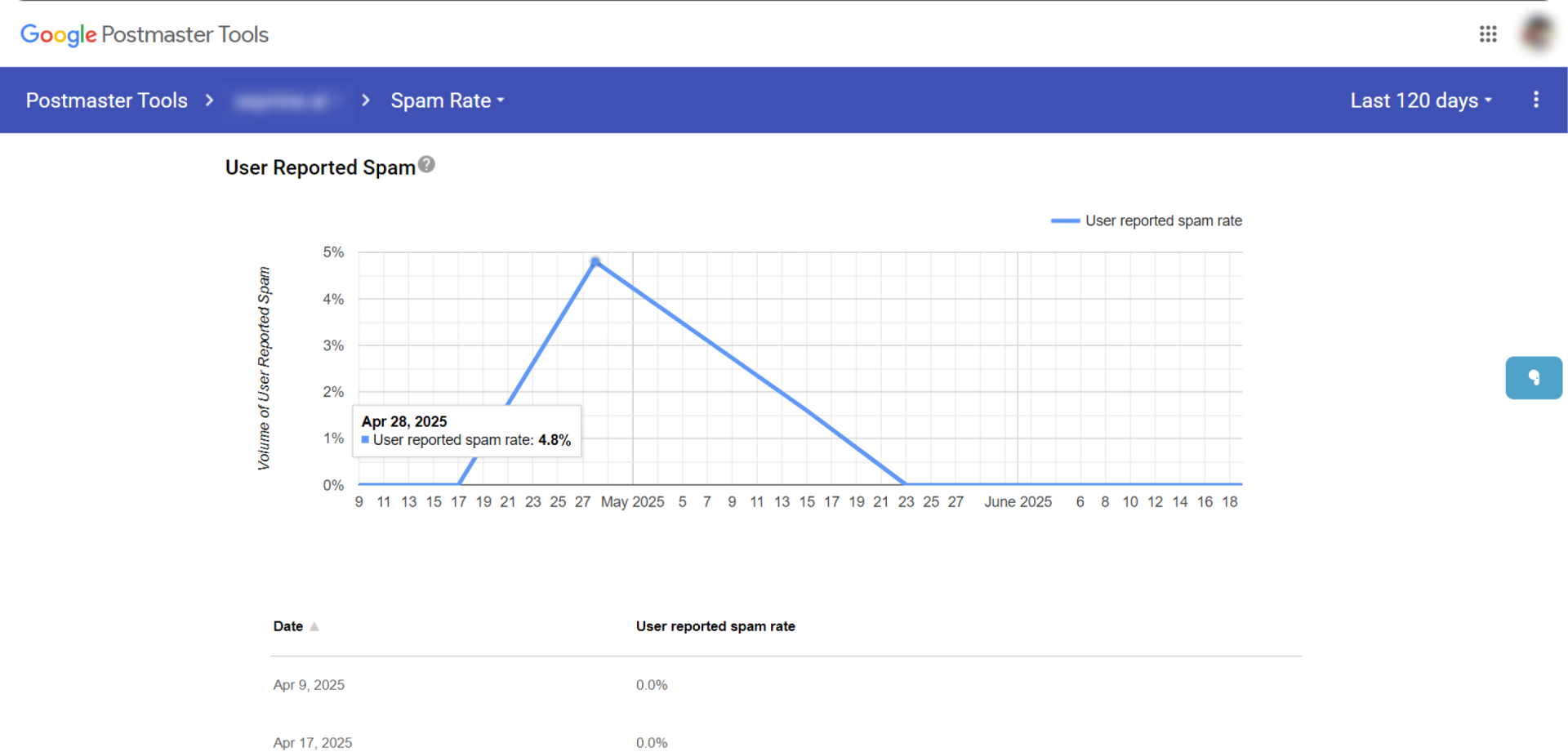
These spam complaints are recorded and used to calculate your domain reputation. The more people mark your emails as spam, the more your domain loses credibility, and the harder it becomes to land in the inbox instead of a spam folder.
Running Bulk Outreach Without a Warm-Up
Email warmup is the process of sending a gradually increasing number of emails from a new email account to build a positive reputation.
Ignoring this step and jumping into an outreach can get your emails straight to the spam folder. It can raise red flags with spam filters, especially if your domain has little or no sending history.
That’s why we recommend taking the time to warm up your email account properly to prevent emails from going to the spam folder.
One tool we use and highly recommend is Snov.io. It gives you clear insights into how many of your warmup emails are going to the spam folder.
In the first screenshot, you can see the “Saved From Spam” column. This shows how many warmup emails were delivered to the spam folder. For example, one account had 124 emails land in spam folder, which highlights just how important warmup is.
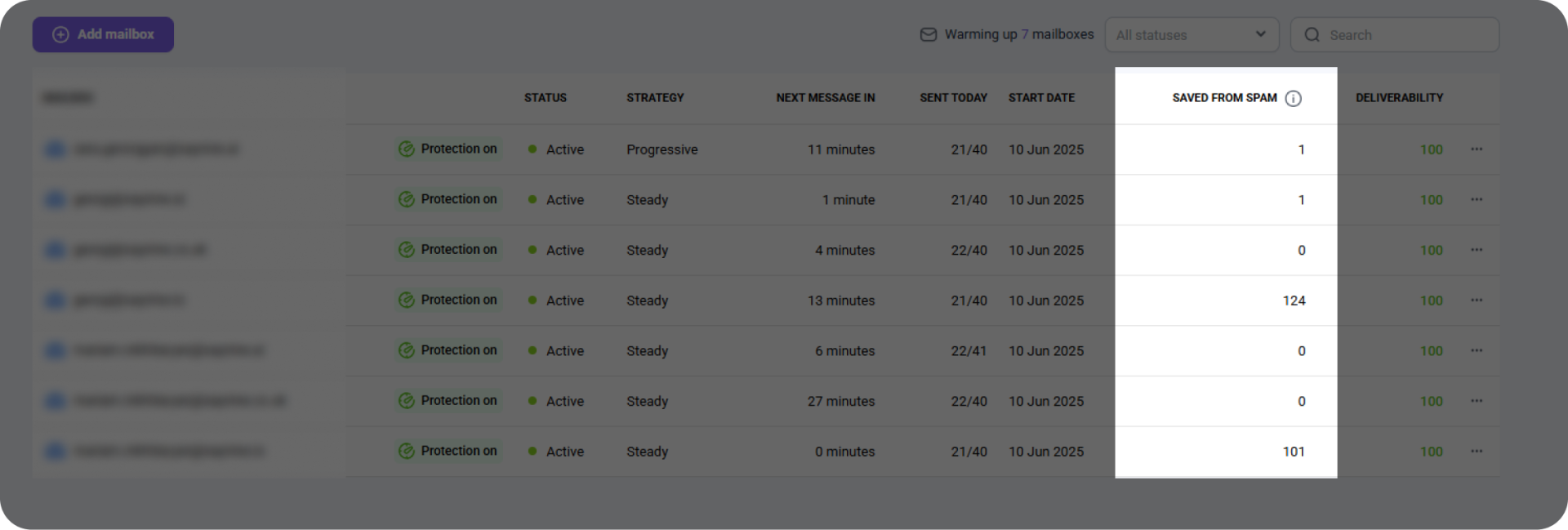
The second screenshot gives a visual overview of inbox placement. Here, out of 40 emails sent, 1 ended up in the spam folder.

Here’s what we recommend when it comes to email warmup:
- Don’t warm up with generic content. Use the actual template you’ll be using for outreach. This way, you can build trust with email providers right from the beginning.
- Send a few test emails to yourself or your team to see where they land. If they go to spam, ask them to mark these emails “Not Spam.” This shows email providers that your messages are legitimate and improves future deliverability.
Overloaded Emails
An overloaded email is one that comes with too much content, such as lengthy texts, too many images, or attachments. These types of emails can overwhelm both your reader and spam filters.
We recommend avoiding:
- Too much text: Long paragraphs can trigger spam filters. They often resemble phishing attempts or malware-laden messages, as hackers often use long texts in their emails to hide malicious links or code within the text, hoping to make the recipients click on them.
Pro tip: Keep your message short, clear, and to the point. Break your content into smaller paragraphs and use bullet points or numbered lists to improve readability.
- Too many visuals: If your email contains a large image and little to no text, it can surely trigger spam filters. This is a common practice used by spammers who add a bunch of text in a single image file rather than as actual text. Such attempts look suspicious to spam filters.
- Attachments: Emails with attachments can raise red flags, as they may can contain malware and viruses. Therefore, it is recommended to avoid sending any attachments, especially if it’s the first cold outreach email.
Misleading Subject Lines
A misleading subject line is another major reason why emails go to spam instead of the inbox.
Below are some examples:
- Hiding the sender’s identity: A good subject line should be clear enough for a subscriber so that they immediately understand who sent the email.
- RE or FW: Making an email appear like it is forwarded or part of an ongoing email thread is another tricky way to earn subscriptions.
- False sense of urgency: Emails with such subject lines create a false sense of urgency. These emails cover urgent situations like security concerns or authentication problems to make subscribers open the email and quickly find out what happened.
Now that you already know what a bad subject line looks like, let’s find out how to write professional subject lines.
- Use action verbs.
- Create a sense of urgency but don’t mislead your subscribers․
- Make sure the subject lines match the content of your email. Otherwise, you risk hurting your reputation.
How to Tell if Your Emails Are Going to a Spam Folder
Not sure if your emails are landing in the inbox or the spam folder? Here are a few signs to watch for:
- Open rates are dropping: If you’ve noticed fewer people are opening your emails, it’s a red flag. This could mean your emails aren’t even reaching their inboxes but end up in the spam folder.
- Others on your team are experiencing the same issue: If you and your teammates are using the same Google Workspace and some of them are ending up in spam, it’s likely the whole domain is affected. In other words, you’re all in the same boat.
- Your warm-up tool is giving warnings: If you’re using a tool to warm up your email, make sure to regularly check the reports. These tools often show where your emails are landing: the inbox or spam folder. Don’t ignore those alerts.
So, we recommend keeping an eye on how your emails are performing. The sooner you catch issues, the easier it is to fix them.
5 Tips to Prevent Emails from Going to Spam
Now that you already know what causes your emails to end up in a spam folder, let’s learn some useful tips to improve your deliverability and make sure your emails reach the inbox.
Warm Up Your Email
Your domain’s reputation and credibility are two things email servers take into account when deciding whether your message is spam or not.
Before you start your email campaign, you will need to warm up your domain and email address to show email servers that your domain and email address are legitimate and trustworthy. This process is especially important as you begin to collect email addresses and prepare to send messages to your growing list.
In terms of credibility, a new domain starts neutral, and the reputation builds up over time. This is exactly why you need to warm up your domain and email address before launching mass email campaigns.
It is not recommended to start email campaigns if your domain is less than six months old. Once you start sending emails, make sure to start slow. Avoid sending 200 emails a day. Instead, gradually increase the number of emails sent each day.
Set Up Email Authentication
As we have already mentioned, poor email authentication is a big issue when it comes to email marketing campaigns. If you lack properly set up email authentication, your emails will land in the spam folder of the recipient.
Email authentication protocols enable email servers to understand if a particular sender is authorized to send emails from a specific domain or email address.
To prevent your emails from getting into the spam folder, consider using the email authentication protocols we have already discussed in this article.
Use a Reputable Email Service Provider
Using a reliable Email Service Provider (ESP) can highly reduce the chances of your emails ending up in the spam folder. These providers have built relationships with prominent email providers, ensuring that their emails are more likely to be delivered to the targeted inbox.
Reputable ESPs comply with email authentication protocols like SPF, DKIM and DMARC. They also actively keep track of and manage IP addresses’ reputation, which plays a significant role in email deliverability.
ESPs keep a good sender reputation by performing strict anti-spam policies and regularly removing users who are involved in spammy behavior. Besides, some major email service providers offer advanced features, including engagement tracking, enabling you to monitor email performance and optimize your campaigns for better inbox placement.
Avoid Spam Words
Trigger words and phrases in your emails can significantly increase spam rates. Such words make you sound like a spammer and trigger spam filters.
Here are some emails we’ve received with subject lines full of spammy words. Annoying, isn’t it?
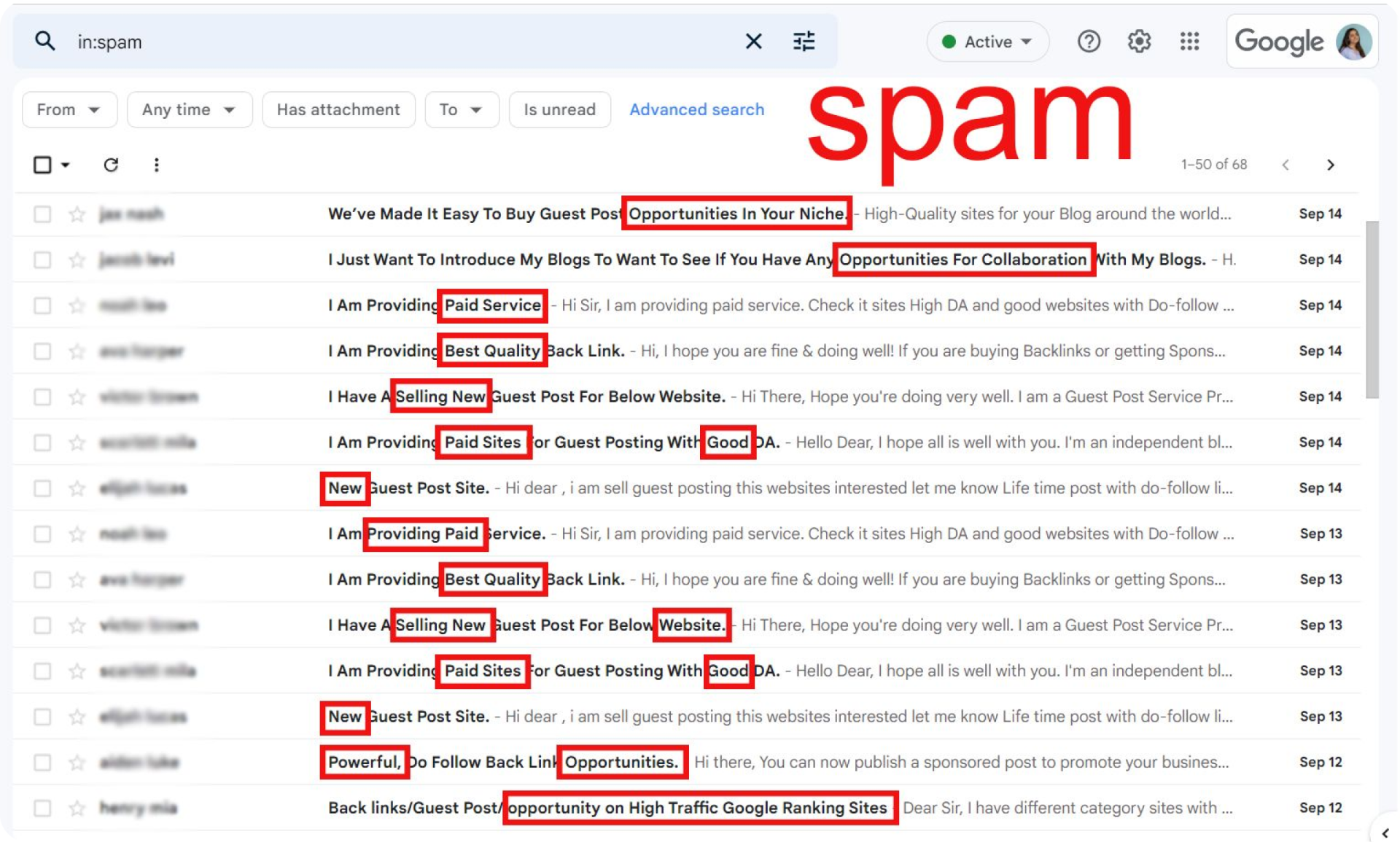
Therefore, it is recommended to use spam checker tools to check your email copy for spam words/phrases before sending it.
Here, at SayNine, we use Mailmeteor’s tool to make sure there are no words that can trigger spam filters.
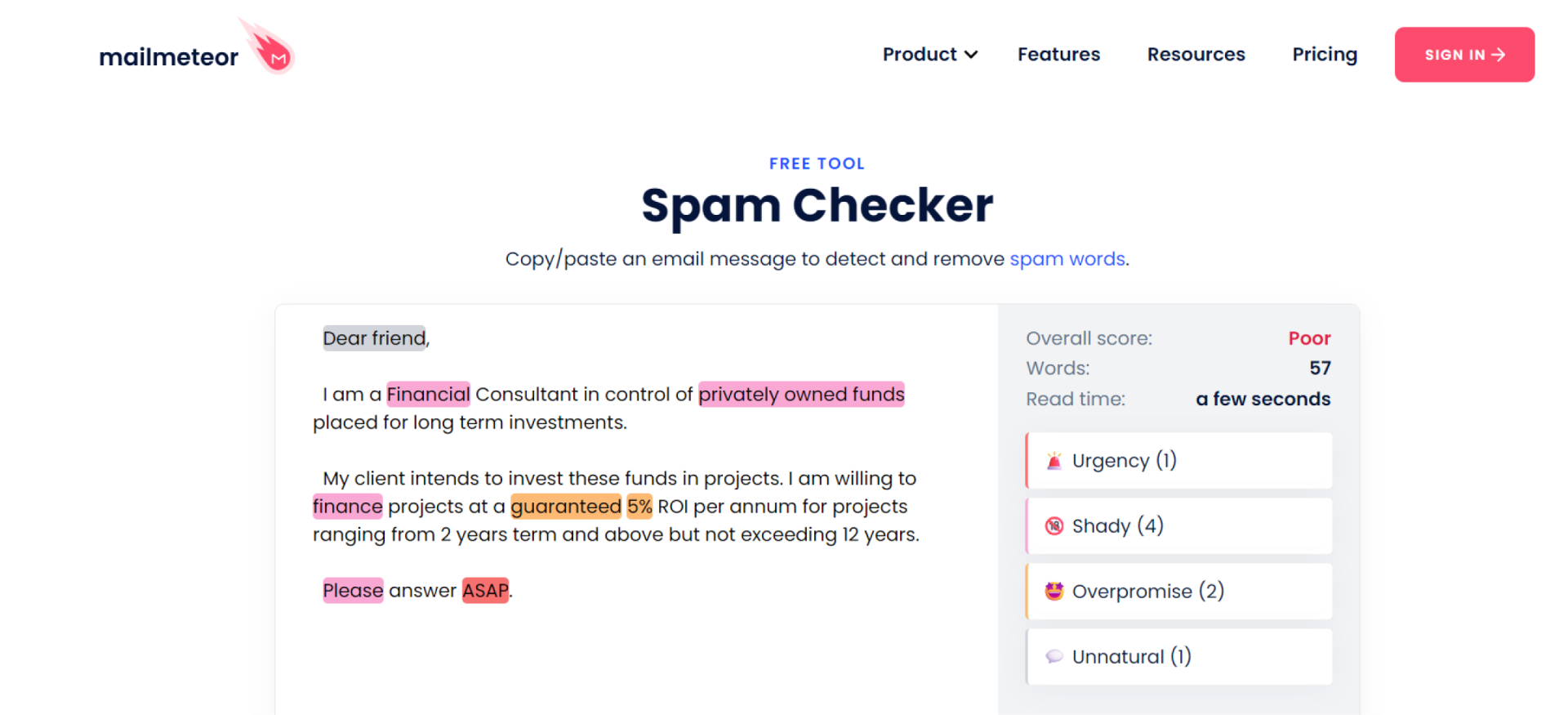
Source: https://mailmeteor.com/spam-checker
In the screenshot above, you can see words that look unnatural, shady, overpromising, and more. Dear friend, for instance, is an unnatural phrase, whereas ASAP shows urgency. By rephrasing or using synonyms, you avoid spam filters.
Include An Unsubscribe Button
Adding an easy-to-find unsubscribe button helps prevent your emails from ending up in spam. When people can easily opt out, the possibility is quite low that they’ll mark your messages as spam. This protects your sender reputation and keeps your emails landing in inboxes.
A simple unsubscribe button shows you respect your audience and keeps your email list healthy and engaged.
Conclusion
It’s frustrating when your emails don’t reach the inbox, but you’re not alone.
You just need the right approach. By warming up your domain, authenticating your emails, and avoiding common mistakes, you can turn things around.
Try these tips step by step, and you’ll start seeing your emails land where they should, in the inbox. Good luck!
FAQ about spam folder
Where do I find my spam folder?
The spam folder is usually placed in your email app’s sidebar or menu, often labeled as “Spam” or “Junk.”
What happens to emails in spam folder?
Emails in the spam folder are automatically deleted, typically after 30 days.
What words trigger spam filters?
Words like “Free,” “Urgent,” “Buy now,” and “Act fast” can trigger spam filters and increase the chances of being marked as spam.