


Give us some info for your personalized offer
Backlinks often get all the attention in SEO, but there’s another type of link that’s just as important. Internal links.
While backlinks connect your website to other websites, internal links are the ones that connect the pages within your own website.
According to 51% of SEOs, content writers should incorporate two to three internal links in their articles, while 36% recommend using three to five.
In this article, we’ll dive into what internal linking is, why we’re big fans of it, and how it plays an important role in improving your website’s performance.
So, first, let’s properly understand what internal links are, anyway.
What is Internal Linking?
Internal links are hyperlinks on a webpage that connects to other pages within the same website. They help users navigate your website and assist search engines in crawling and indexing your content.
We think of internal linking as the backbone of your website’s navigation.
Otherwise, it will be harder for users to find what they need, and search engines might miss out on some important pages.
So, let’s take a closer look at how this works.
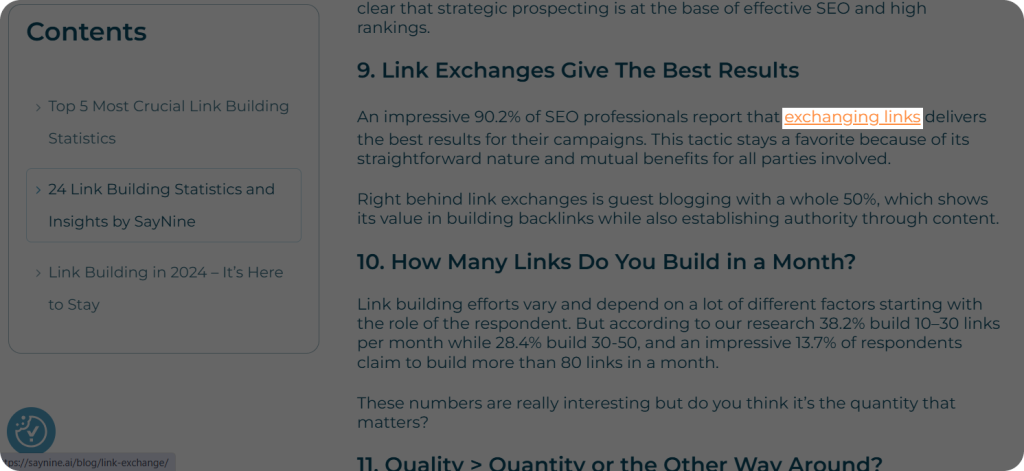
Here’s a real example of an internal link in action on our website: We’re discussing link exchange, and you can explore more insights by clicking on our blog post about it.
Not only does this make it easier for users to find additional information, but search engines also value the organized structure that internal links provide!
But hold on!
How does internal linking help SEO?
Why Are Internal Links Important?
Our team approach is that internal links might seem small, but they play a big role in how well your website functions.
When you visit a website, it’s like entering a new world with many different rooms, and they act like helpful signs that guide you in the right direction.
Not only do they improve the user experience by making it easier to find relevant content, but they also help search engines understand how pages are related on your website.
So, why should you pay attention to them?
Our content team says they are important for both your website’s performance and growth, and here’s why.
Building a Strong Website Hierarchy
Internal links play a key role in shaping your website’s hierarchy.
By linking pages in a clear and logical flow, you help users easily find what they need, whether it’s a top-level page or more detailed content.
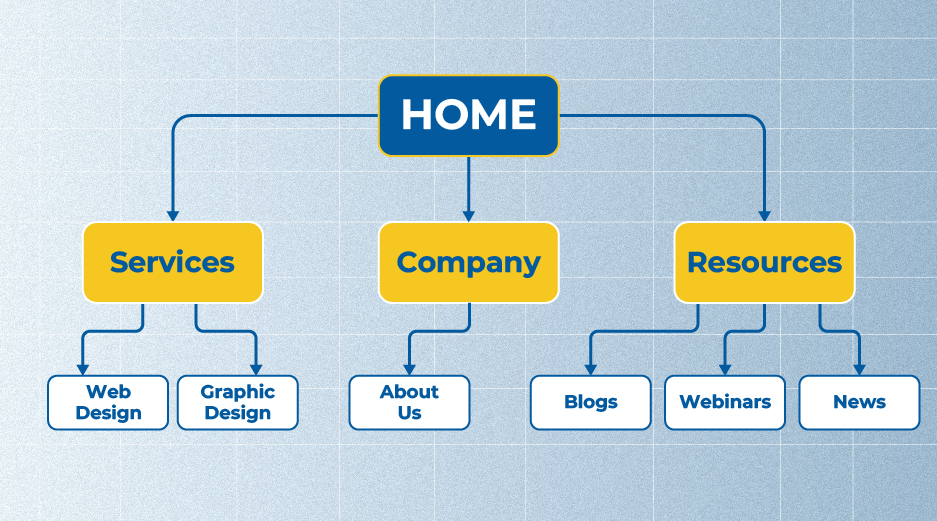
This makes browsing your website intuitive and smooth, reducing confusion and keeping visitors engaged.
A well-structured website makes it much easier for visitors to navigate, doesn’t it?
For sure!
Internal linking best practices help ensure that your website structure is optimized for both user experience and search engines.
Promote Key Pages
By linking to other blog posts or pages, you can direct traffic to them.
This helps more of your content get noticed and read, keeping visitors engaged with different parts of your website.
How to find internal links to a page? A great way is to use tools or manually check your website structure to identify opportunities for linking. This process also helps reveal orphan pages that have no inbound links, allowing you to integrate them and boost their visibility.
Don’t you think that’s a simple way to share more of your content?
It absolutely is!
Building Trust with Google
From what we’ve seen, when Google sees your website using internal links, it gets a clear message: this website is organized and well-structured.
Google begins to “trust” your website more because those links show that you’re guiding users to relevant information.
The more trust Google has, the better your chances of ranking higher in search results.
Better User Navigation
Internal links help keep users on your website longer, which is great for engagement. Isn’t that the goal?
Our content team has seen it firsthand. For example, once we linked to a fun quiz page, users ended up spending more time answering the questions and checking out other parts of the website.
Another time, we linked to a downloadable resource, like a helpful guide or checklist. When visitors clicked on these links, they spent more time exploring other pages and engaged more with our content.
So, our SEO team believes this increased engagement is not only great for our users, but we also believe it signs to search engines that our website is valuable.
Helping Search Engines Find and Index All Your Pages
As your website grows, some pages might get “lost” because they don’t have any links pointing to them.
Our SEO team often sees this happen. These pages can be hard for search engines to find, like forgotten corners of your website. Even though sitemaps list all your pages, Google might still take a long time to discover them.
To improve your site’s SEO, it’s crucial to know how to find internal links to a page, ensuring they are connected and easy for search engines to spot. Additionally, when you update content for SEO, ensuring that internal links are refreshed and correctly point to relevant pages will further enhance your site’s discoverability by search engines․
So, they help by working like shortcuts, guiding search engines directly to your new pages.
When you link to these pages from other parts of your website, search engines can find and list them faster.
In short, this makes your content easier to find and helps your website perform better.
You might also notice links on the website that lead to other websites, not just the same one. So, what role do these links play?
Let’s explore that next.
Internal Links vs. External Links
As we already know, internal links are the connections that link one page of your website to another.
External links, however, are those that direct users from your website to other domains or websites.
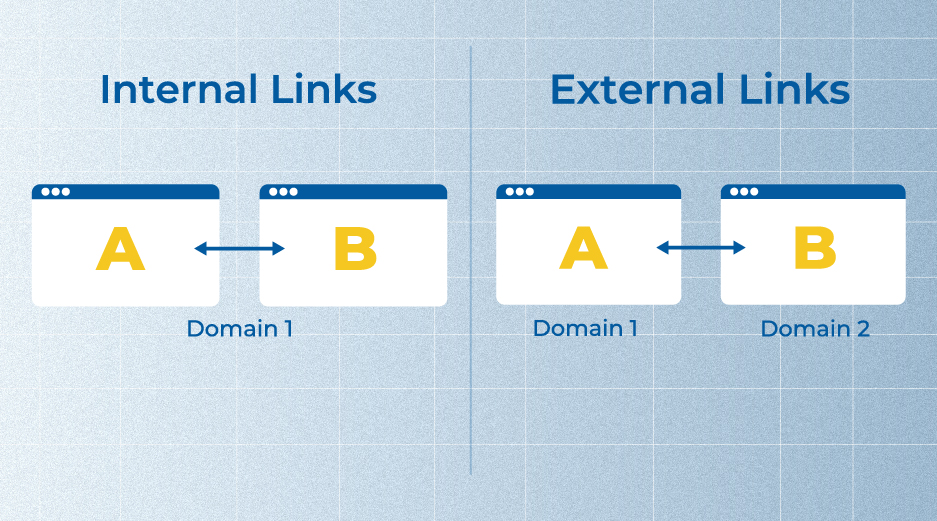
These two types of links serve different purposes.
External links help build your website’s credibility and authority by referencing reliable information from other websites.
On the other hand, they improve the navigation and structure of your website, enhancing the overall user experience.
When using external links, it’s important to follow external links best practices to ensure they contribute positively to your website’s authority and user experience.
So, we recommend using both internal and external links, as they play different roles but are equally important for your website’s success.
Next, let’s talk about how you can decide where to place your links.
How to Choose the Best Placement for Your Internal Links
It’s essential to find internal links that blend seamlessly with your content’s structure and themes.
Here are a few tips we recommend for choosing the ideal spots to place your links for maximum impact.
When considering placement, following internal linking best practices can help ensure that links are both useful and relevant to the reader.
Anchor Relevance
We suggest that when choosing anchor text for your links, it’s important that it’s relevant to the topic you’re discussing.
For example, if you’re writing about link building outreach while using the exact phrase “link building outreach” as your anchor text is fine, we suggest using variations or synonyms like “outreach strategies for link building” or “effective link building techniques.”
This approach keeps the content natural and without overstuffing keywords. For more tips on maintaining a balanced and organic approach, check out our guide on how to avoid keyword stuffing while optimizing your content.
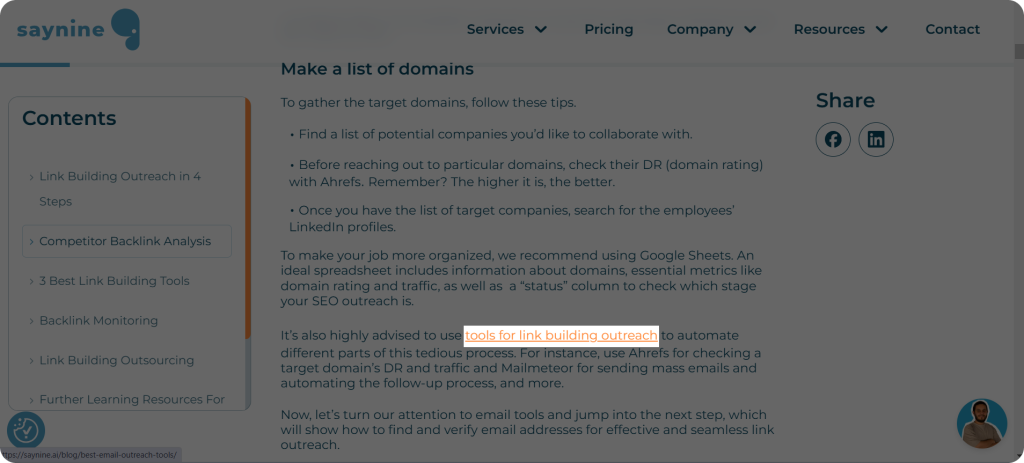
Here’s how we’ve made internal links work – helping users navigate and giving search engines a little direction.
Oops, I almost forgot to mention – varying your anchor text helps avoid an exact match with the slug, which could actually hurt your SEO performance.
A good strategy includes using common types of anchor text like exact match, partial match, or branded anchors to create a natural, diverse linking structure.
Alright, now that we’ve covered that, let’s move on to the next point.
Highlight Important Pages
From what we’ve found, placing links strategically can help ensure your most important pages get the attention they need.
For instance, if you have a key landing page or a blog post you want more visitors to see, add an internal link to it within related content.
This increases the chances of users finding those pages.
Avoid Linking to Unused Pages
Our approach is to be strategic with where you place your links.
Some pages on your website may no longer be active or relevant, and linking to them could make your website feel like a ghost town.
Instead of using these pages as links, place them where they won’t create unnecessary confusion or “emptiness.”
You don’t want to send users to pages that lead nowhere, like showing them an empty fridge and telling them there’s food inside!
In short, understanding how to find internal links to a page helps you keep your website connected, relevant, and user-friendly.
Don’t Overdo Links
From our experience, it’s best to keep links balanced and purposeful.
When adding links, remember that one per paragraph is usually enough. But, it’s not a strict rule. Use your judgment and add links where they truly make sense and enhance the user experience.
Too many links can confuse the reader and make the content feel messy.
Instead, focus on placing links where they genuinely add value and provide extra information. It’s not about the number of links, but about using them purposefully to direct users to valuable and relevant content.
Internal Linking Audit: How to Improve Its Structure
Auditing internal links doesn’t have to be complicated.
You can easily audit your internal links using tools like Ahrefs and Screaming Frog. However, our specialists prefer Ahrefs to our website’s link structure.
So, for now, let’s start with Ahrefs and see how it can help you keep your links in check.
Step 1: Enter Ahrefs and choose Site Audit. It will automatically crawl your website to gather all the necessary data.
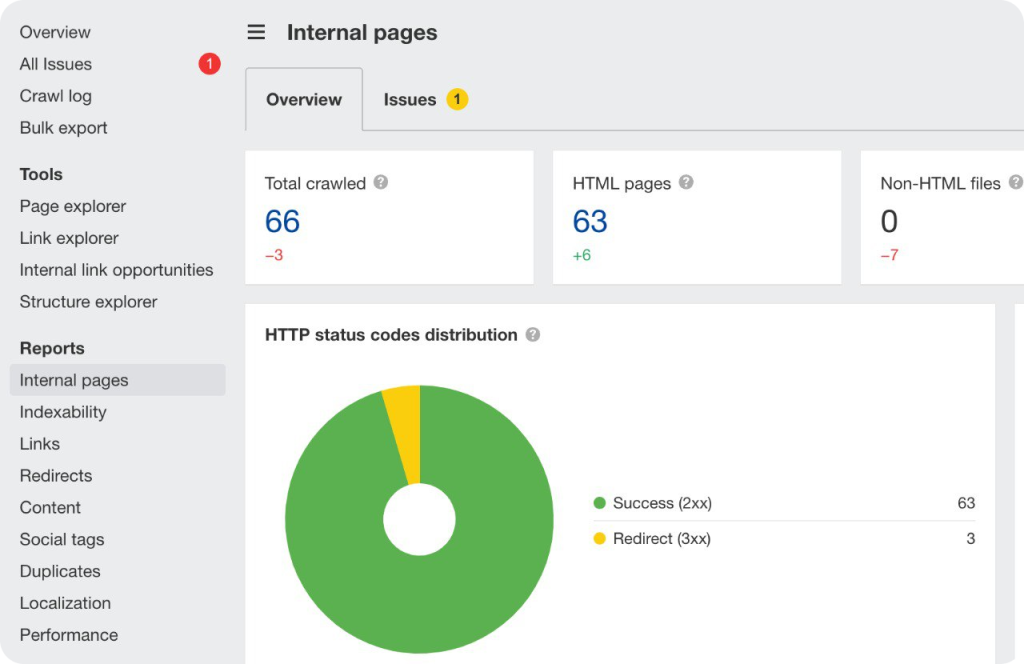
Here you can see in this example, there is one issue only.
However, there can be other issues that need to be addressed during your internal linking audit.
- Canonicalization Issues: When multiple pages with similar content exist, search engines may struggle to determine the original source. This can result in lower rankings due to perceived duplicate content, a common canonical issue. To resolve this, ensure you implement canonical tags to designate the preferred page version
- Broken Internal Links: Broken links are links that no longer work, which can discourage users and harm your website’s SEO.
When someone clicks on a broken link, they may end up on a “404 error” page, which means the page can’t be found. This can make visitors leave your website, negatively affecting their experience.
To avoid this, it’s important to regularly check that all internal links (links that point to other pages on your website) are working properly. If you’re wondering how to fix broken links, knowing the right tools and techniques can help ensure your website stays error-free and provides a seamless experience for visitors.
So, by fixing broken links, you help users navigate your website smoothly without running into dead ends.
- Orphan Pages: Orphan pages are pages on your website that don’t have any internal links pointing to them from other pages.
This can make it difficult for search engines, like Google, to find and understand these pages.
As a result, these orphan pages might not appear in search results, making them harder for users to discover.
To avoid this, it’s important to link every important page to other pages on your website.
- Find Internal Link Opportunities: To discover relevant places to add internal links, head over to the left side of the dashboard and click on “Internal Link Opportunities.”
This will highlight places on your website where a link would fit perfectly.
When you see a highlighted anchor text that matches a relevant page, go ahead and add the link. By following internal linking best practices, you improve anchor optimization, which helps search engines better understand your website’s structure and guides users to related content. This practice enhances anchor optimization, helping search engines better understand your website’s structure while guiding users to related content.
So, by doing an internal linking audit, you’ll not only help users find related content but also make it easier for search engines to understand your website’s structure. A website analysis checklist can ensure you don’t miss any crucial steps in the process.
It’s a simple way to improve both your website’s navigation and SEO.
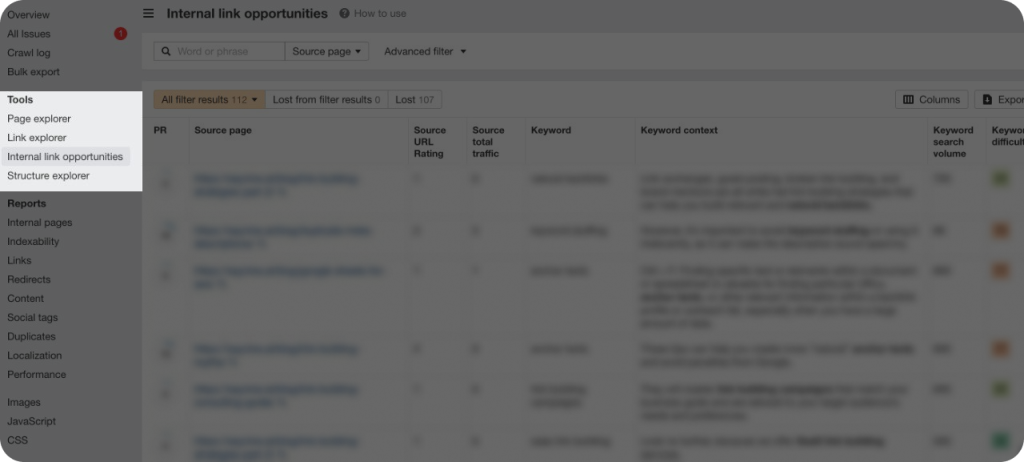
Here’s an example of the highlighted places where you can add links.
So, take the time to regularly check and update your internal links. It’s a small effort that can make a big difference.
Key Takeaways
Regularly audit your website for orphan or broken links and choose concise and relevant anchor text.
Internal links are hyperlinks within a webpage that connects to other pages on the same website.
Internal links work as a guide for both users and search engines, ensuring easy navigation and helping your website stay organized.
Internal links guide users within your website, while external links build your website’s authority. Both are key to success.
Placing links strategically is key for both user experience and SEO; use relevant anchor text, highlight important pages, avoid linking to outdated content, and don’t overdo it.
FAQ about internal linking
Why should I use internal links on my website?
Using internal links improves user experience by making it easier for people to find related content. It also helps search engines understand how your pages are connected.
Can internal links improve user experience?
Yes! By linking to related content, you keep users engaged and encourage them to explore more of your website. It makes the browsing experience smoother and more enjoyable.
How many internal links should I add to each page?
There’s no exact number, but we suggest adding two to five internal links per page. The goal is to make the links relevant and helpful, not overwhelming.
How can I make sure my internal links are helpful?
Use descriptive anchor text (the clickable part of the link) that tells users exactly what they’ll find when they click.