


Not all backlinks help your rankings. Some do nothing. Some actively hurt your SEO.
A backlink audit tells you which is which.
It’s the process of checking every site that links to you, so you can keep the good links, clean up the bad ones, and spot new opportunities. In this guide, you’ll learn what a backlink audit is, how to run one step by step, and which tools make it easier.
What is a Backlink Audit?
A backlink audit is the process of analyzing the websites that link back to you. The main goal is to check your overall backlink profile and understand what type of backlinks you get, toxic or good ones.
There’s no fixed schedule for how often you should do it. But a few things usually signal it’s time:
- A drop in rankings or traffic
- A recent Google update
- Right before you launch a new link building campaign.
If you notice any of these, run an audit and fix the issues.
Why is a Backlink Audit Important?
A proper backlink audit can do a few important things for you.
- Help you clean up your backlink profile
- Find spammy backlinks that may hurt your rankings
- Identify lost backlinks from important websites
- See which backlinks are actually helping your SEO
- Check if your anchor texts look natural or over-optimized
- Understand why rankings or traffic may have dropped
Now let’s look at how to actually do this.
7 Simple Steps to Run a Backlink Audit
Step 1: Choose Your Tools
Start by choosing the right tool.
A good free option is Google Search Console. It has a Links report that shows your backlink data. Here’s how to check it:
- Open Search Console, select the website (property) you want to check, then click Links in the left sidebar.
- This opens an overview showing your External and Internal links.
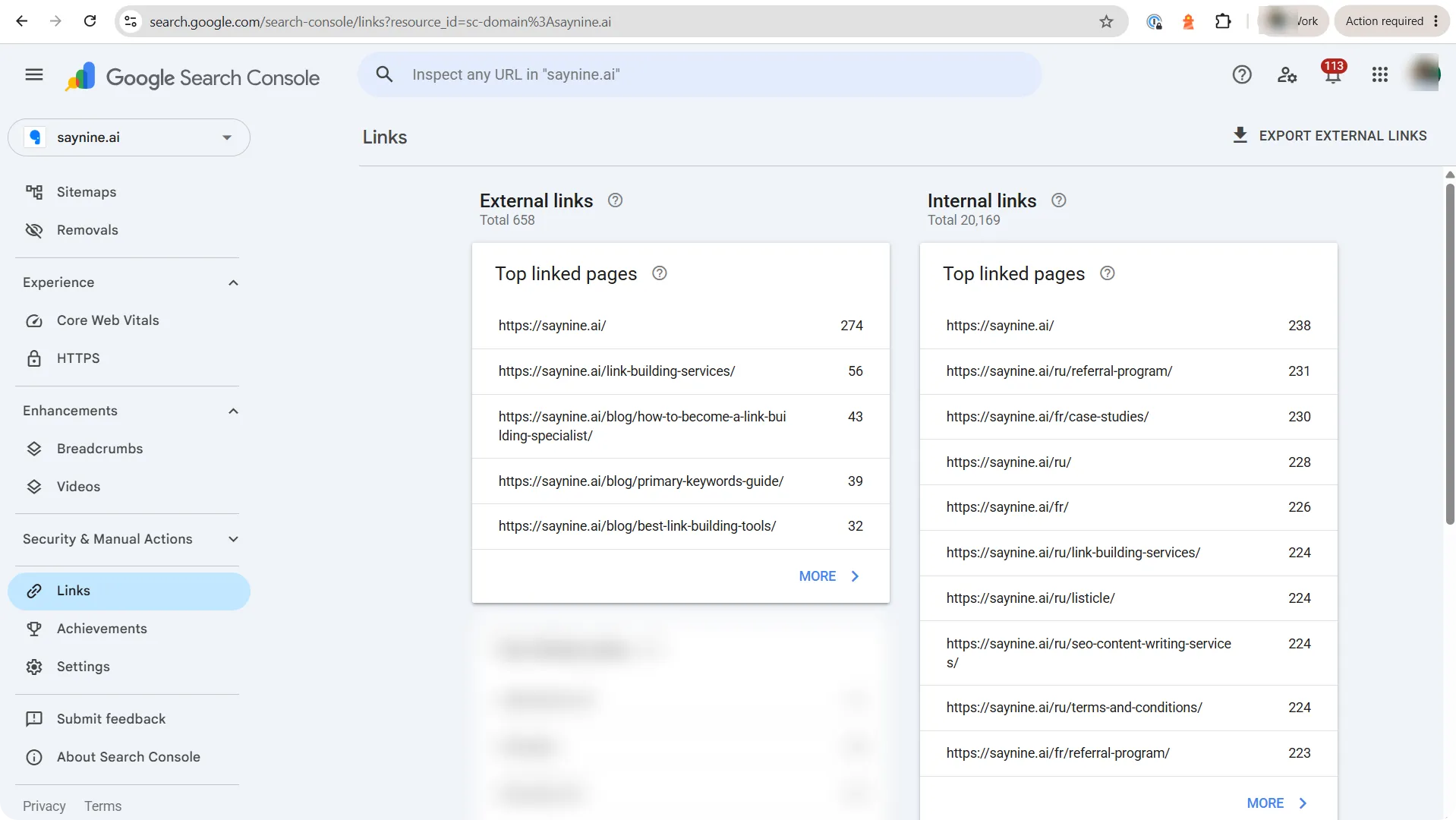
- Under External links, click Top linking pages to see which pages get the most links.
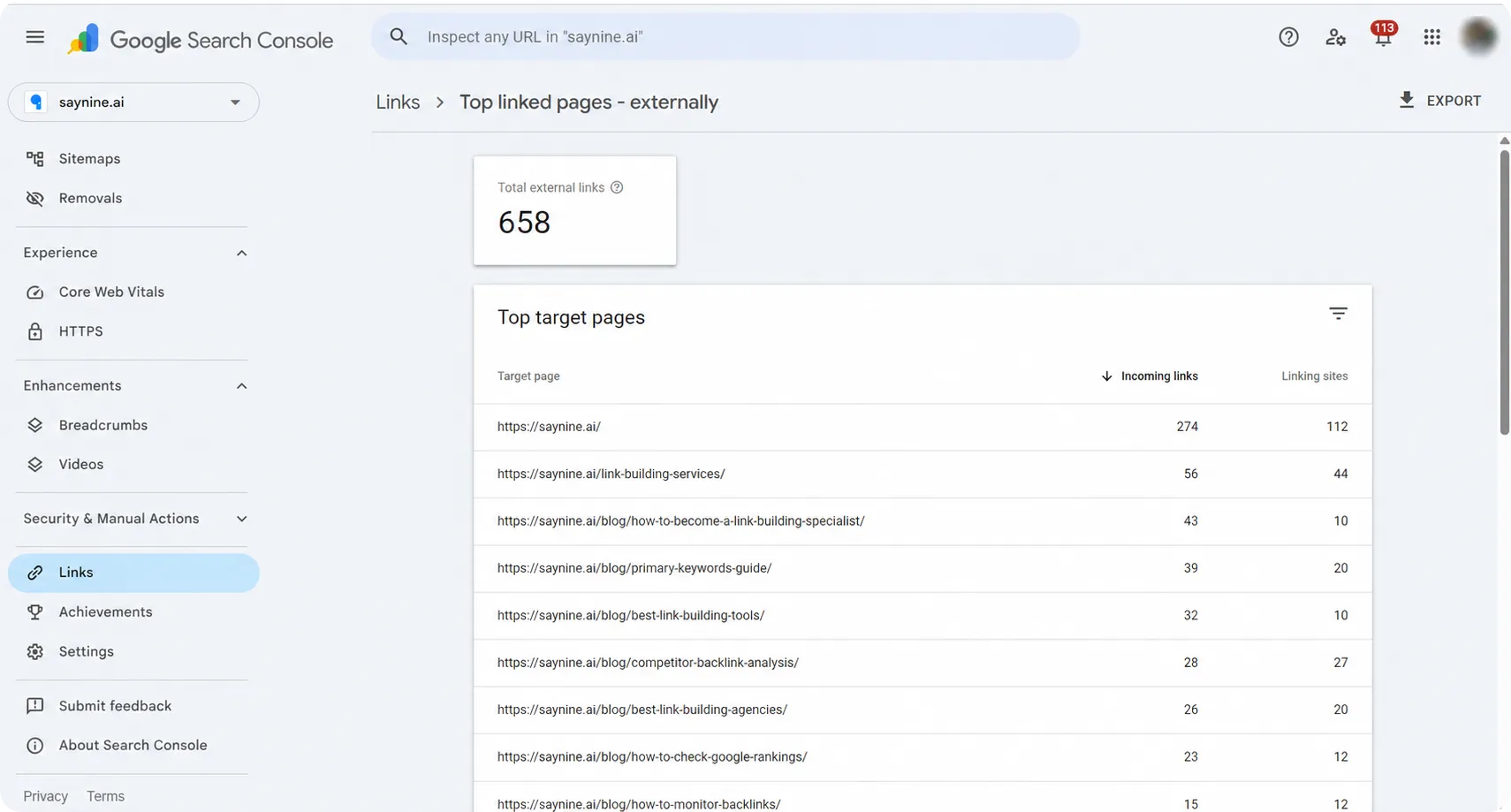
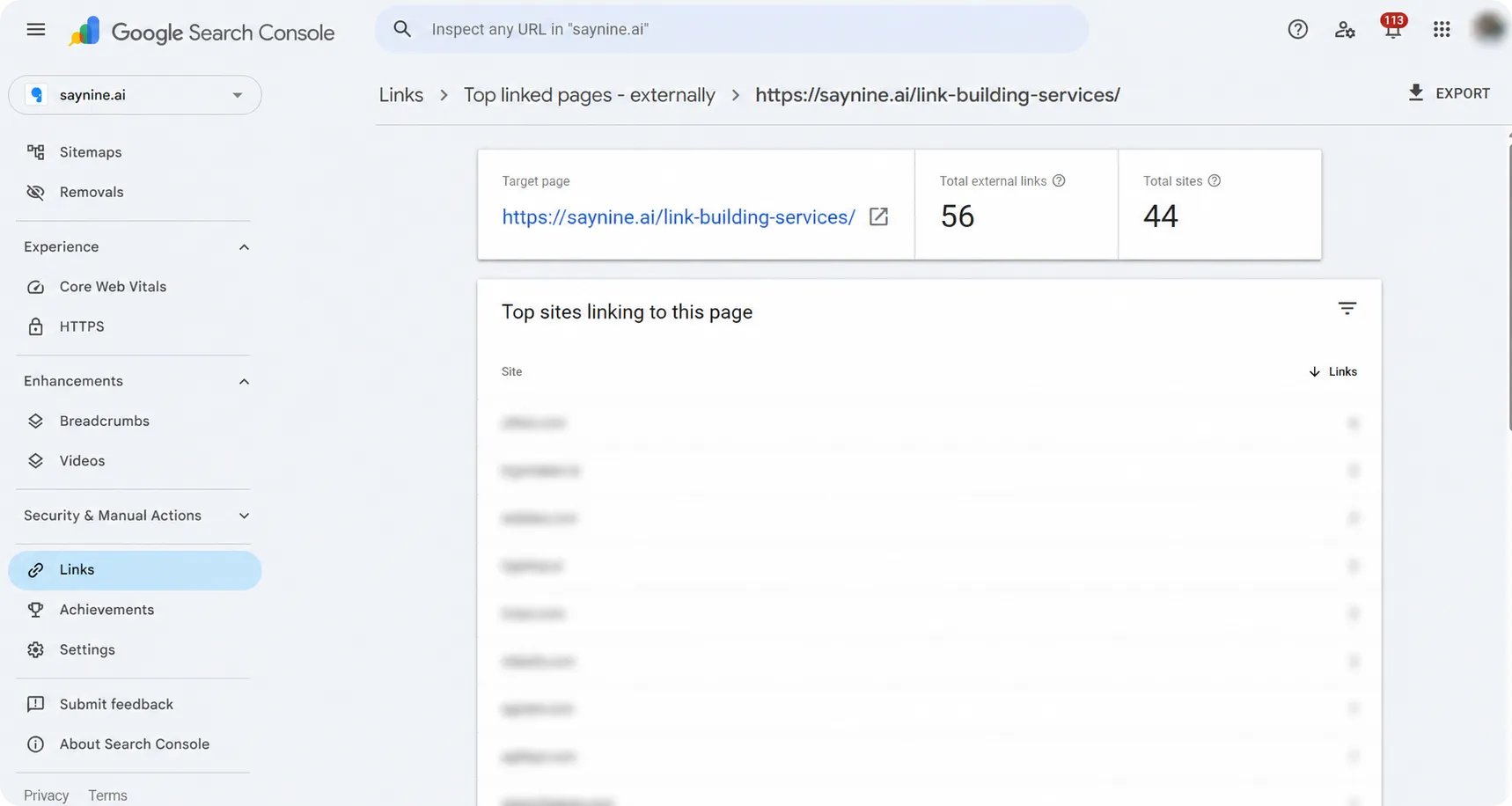
- Click any page to see the specific sites linking to it.
- Then, click Top linking sites to see which domains link to you the most.
Step 2: Analyze Your Backlinks with Ahrefs Site Explorer
Ahrefs Site Explorer tells you a lot about your backlink profile.
Start with the basics: total backlinks, DR (Domain Rating), referring domains, and more.
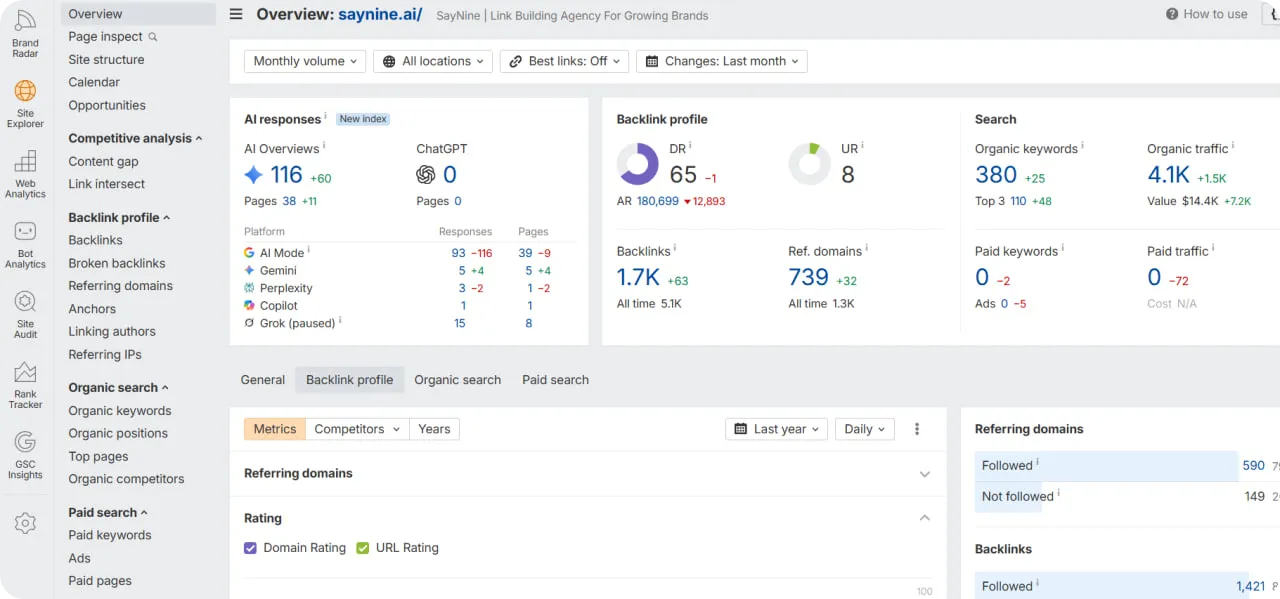
But don’t stop there. Raw numbers only show so much. Use filters to focus on the links that count. A few to try:
- High DR and traffic 1K+: high DR means the site is trusted, and real traffic means the link sends both authority and real visitors.
- Dofollow only: shows the links that pass a real value.
- One link per domain: links from many different sites are worth more than many links from one site.
- Link type: content: finds links placed inside articles, which usually matter most.
- Language: flags links from sites in languages your audience doesn’t read.
- Lost links: shows links you’ve dropped, so you can try to win them back.
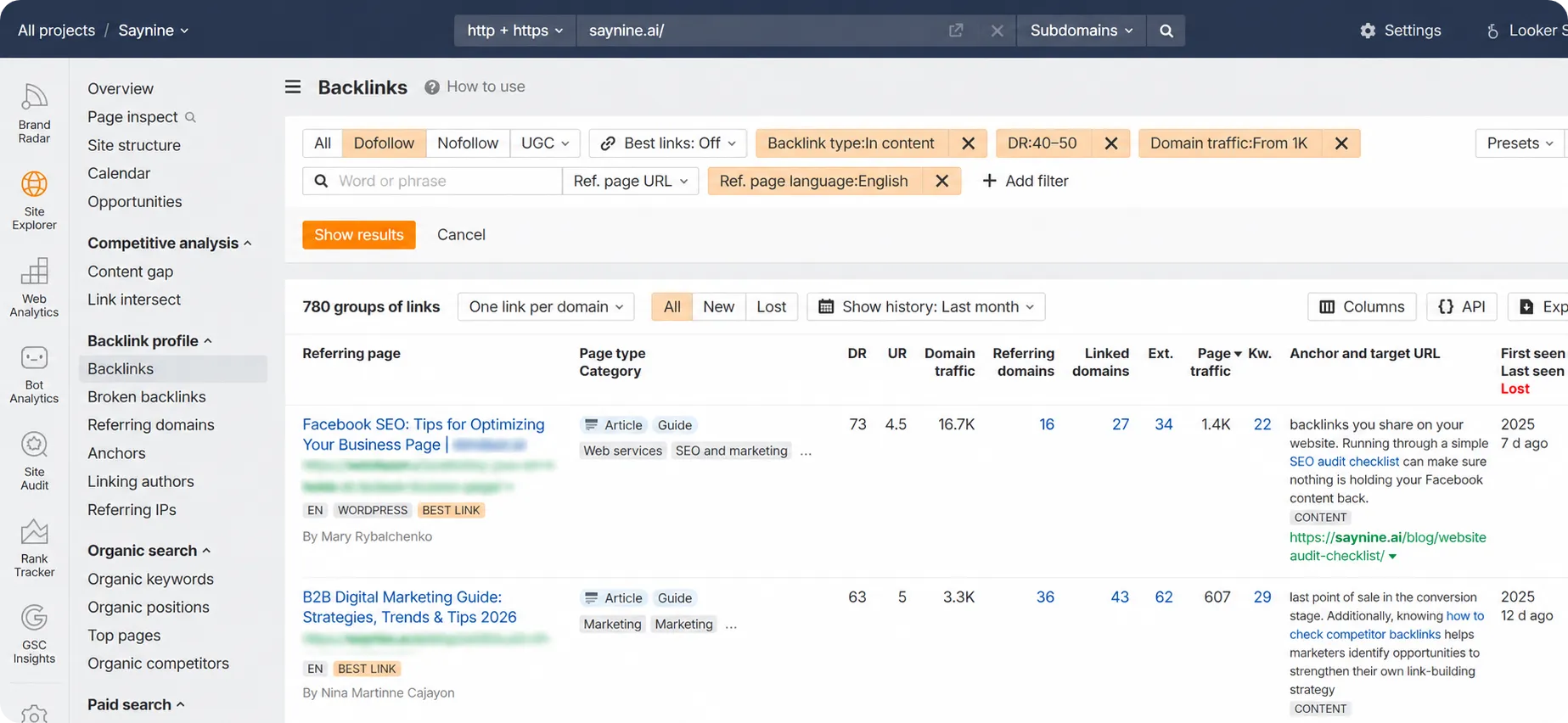
Together, these filters help you tell apart valuable links from those that add nothing to your site’s performance.
You can also use the table below as a quick reference for what a healthy backlink looks like, and what a red flag looks like.
| Metric | ✅Healthy sign | ❌ Red flag |
|---|---|---|
| Dofollow vs nofollow | A natural mix, with dofollow as the majority | Almost all dofollow, or a sudden flood of nofollow spam |
| Referring domains vs backlinks | Backlinks coming from many different websites. Note: A few links from the same site are fine. Just know that each extra link from that same site counts for less. The first link from a domain carries the most weight. The second, third, and beyond add much less. | Hundreds of links from just one or two sites |
| Anchor text | Natural anchor texts, a mix of short-tail and long-tail keywords | Exact-match keywords or generic anchor texts, such as “Click here” |
| Referring domain quality | Most links from relevant, high-authority sites | PBNs, directories, spammy or irrelevant sites to your niche |
Step 3: Find Out Broken Backlinks
Broken backlinks are links from other sites that point to a page on your site that no longer exists. People click the link, but your page returns a 404.
You can find them fast in Ahrefs. Add your domain, then click Broken backlinks in the left menu. You’ll see every link to a dead page, with its anchor and target URL.
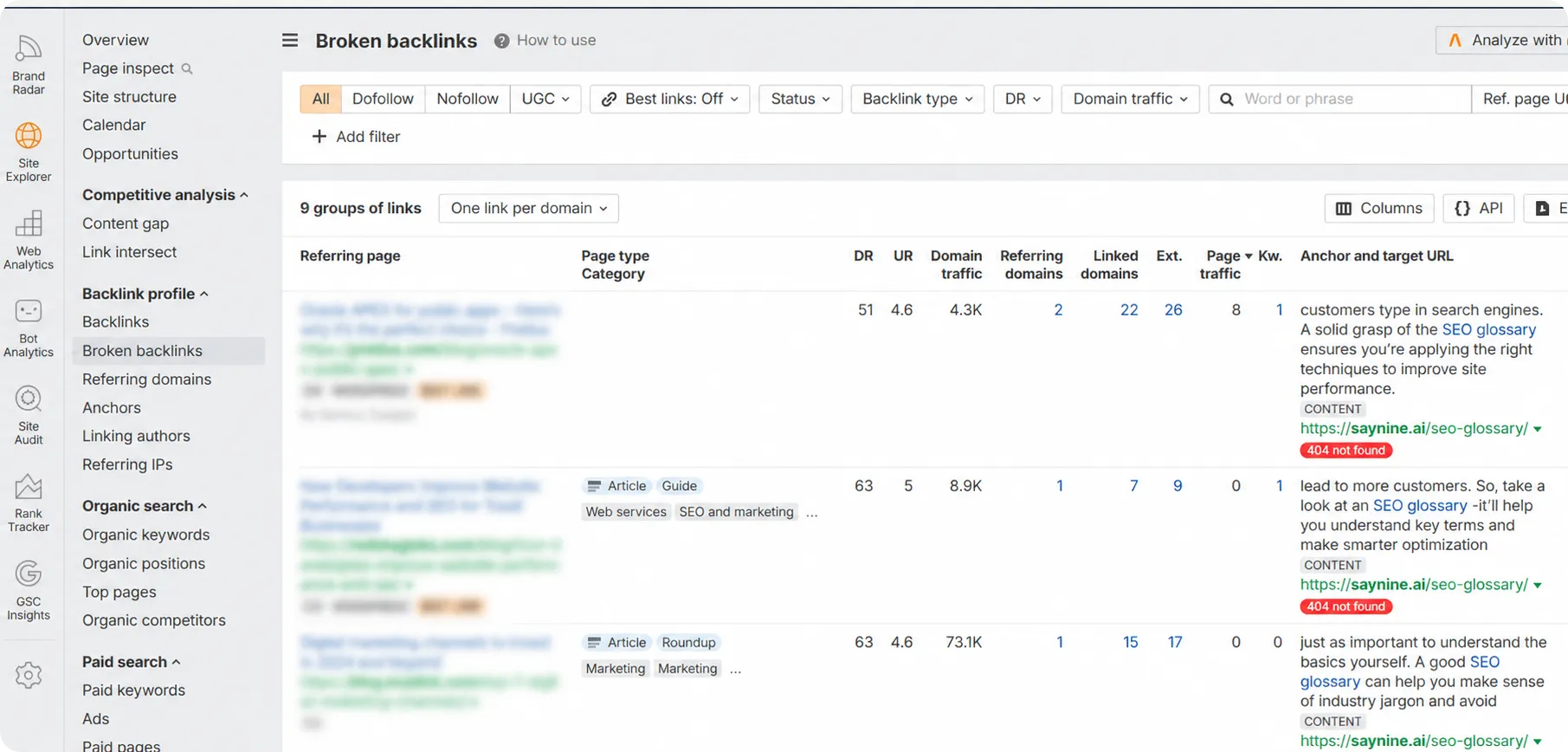
Broken backlinks don’t add value to your backlink profile, but they’re easy to fix. All you need to do is set up a 301 redirect from the dead URL to a relevant live page. That passes the value to a working page and keeps your profile clean.
Step 4: Check Your Lost Backlinks
Lost backlinks are links you once had but don’t anymore. Maybe the page was removed, your link was taken down, or the site went offline.
Losing a few strong ones at once can hurt your rankings. Here’s how to check with Ahrefs:
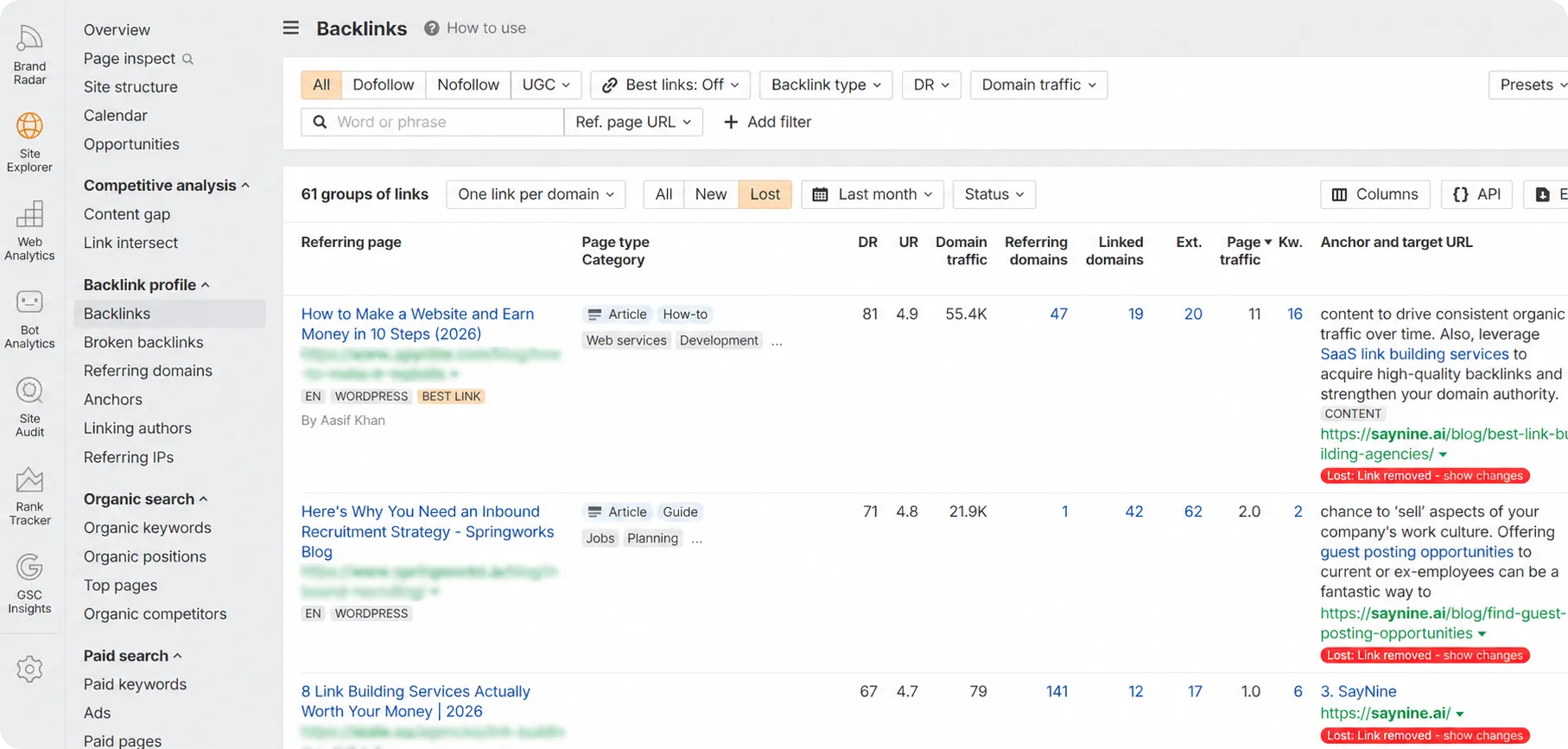
- Open Site Explorer and enter your domain.
- In the left menu, click Backlinks.
- Set the filter to Lost.
- Sort by DR or traffic to spot the links that mattered.
Then reach out to those site owners and ask for the link back to reclaim lost backlinks.
Step 5: Find Toxic Backlinks
Toxic backlinks are low-quality links that can hurt your rankings or even trigger a Google penalty. Cleaning them up keeps your profile healthy.
Ahrefs has no “toxic” filter, but you can find bad links with real ones:
- Open Site Explorer and enter your domain.
- In the left menu, click Backlinks.
- Then, apply the following filters to spot toxic ones:
- DR: set to 0–10 for the weakest domains.
- Domain traffic: set to 0–100 for sites with almost no traffic.
- Anchor: type spammy terms like “casino,” “cheap,” or “payday loan.”
- Language: pick one that isn’t your audience’s (e.g., Russian or Chinese).
- Check the flagged links manually to confirm they’re spammy.
Then disavow them, so Google ignores those links.
A word of caution: disavowing links is not something to do lightly. Only use it if you have a manual action in Search Console, or you’ve been hit by a clear negative SEO attack. Disavowing good links by mistake can hurt you more than the spam would have.
Step 6: Check Your Anchor Text
Anchor text tells Google what to rank you for. Use the Anchors report in Ahrefs to check two things:
- A natural mix. Use anchor text variations. Using too many exact matches can look spammy and may even get you penalized.
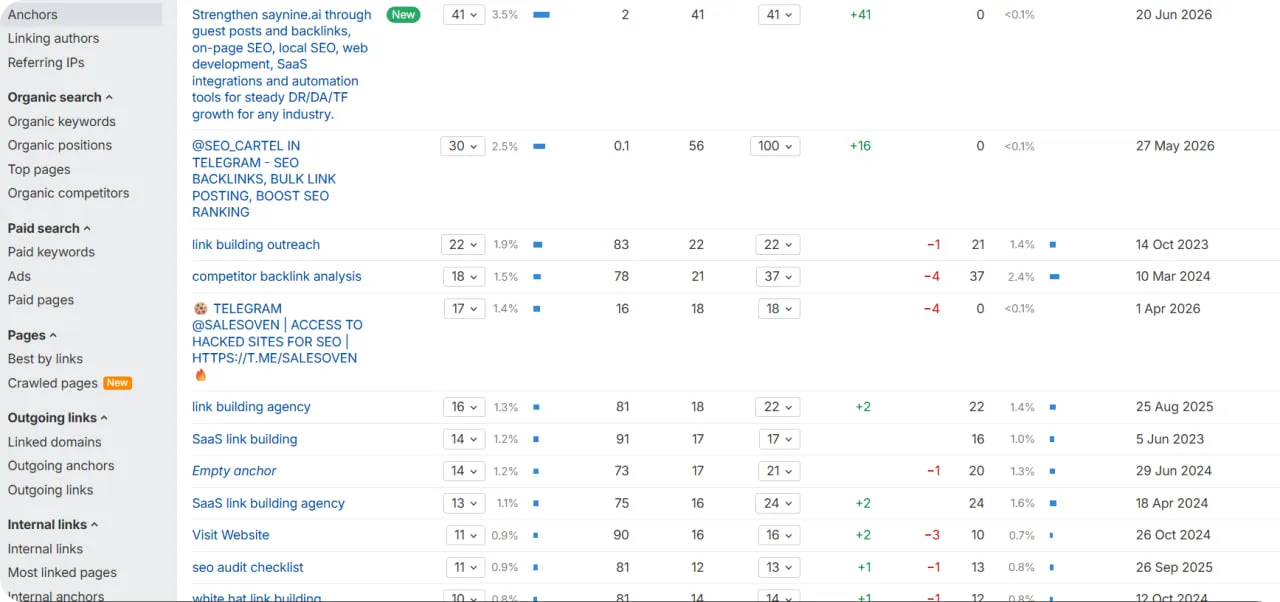
- The right keywords. The words your links point to should match the pages you want to rank.
You can also run the same report on a competitor. It shows the keywords they target and the sites linking to them.
Step 7: Spot Backlink Gaps Using Link Intersect
How do you find new link building opportunities? What about sites that link to your competitors but not to you? That’s exactly what the Link Intersect tool gives you. These sites already link to pages like yours, so they’re more likely to link to you too.
Here’s how to run competitor backlink analysis in Ahrefs:
- Open the Link Intersect tool in the left menu.
- Enter your competitors’ domains in the top boxes.
- Add your own domain in the “But doesn’t link to” box.
- Click “Show link opportunities.”
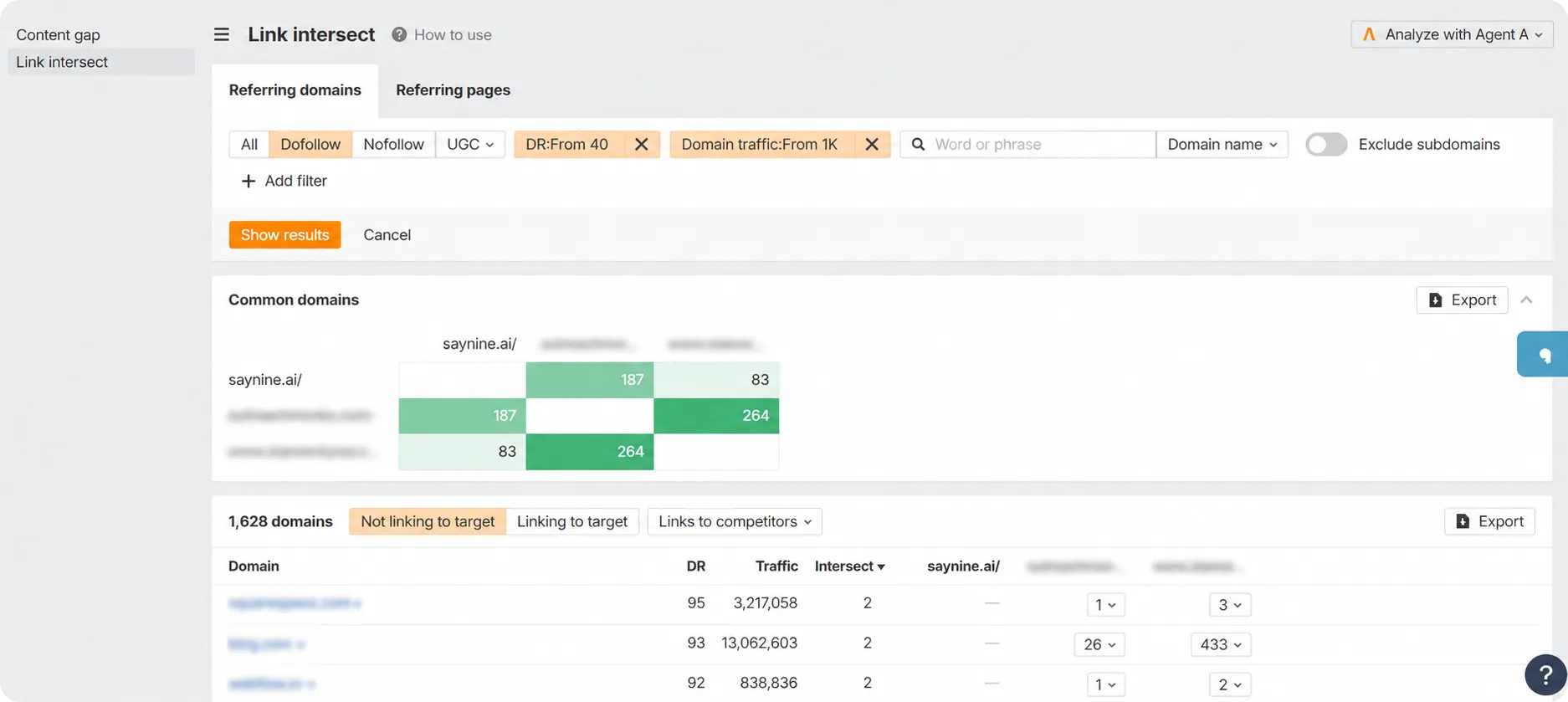
Then use filters to narrow the list to strong, relevant prospects: DR 40+, domains with 1K+ traffic, English pages, and titles with “best” (to catch listicles and roundups you’d want to be in).
Now you have a clean list of targets. Reach out and pitch your site. These are people who already link to content like yours, so they’re a natural fit.
Wrapping Up
A backlink audit isn’t a one-time task. It’s about consistently keeping your link profile clean and your rankings safe.
Now you know the full process: choose your tools, analyze your links, fix broken and lost ones, get rid of the toxic links, check your anchor text, and find new opportunities with Link Intersect.
Start with the free option in Google Search Console if you’re new. Move to Ahrefs when you want more detailed analysis.
Short on time or want a second set of eyes? Our SEO audit service checks your backlink profile, finds what’s hurting your rankings, and provides you with a clear report on how to fix it. You can start with a free audit and see where you stand.
FAQ about backlink audit
Can I check my backlinks in Google Search Console?
Yes. Log into Google Search Console, click the Links tab in the left menu, and look at Top linking sites and Top linked pages. It’s free, and the data comes straight from Google.
What are the 3 main features of a quality backlink?
The three main features of a quality backlink are relevance, authority, and naturalness. Together, they tell search engines your content is trustworthy and worth linking to.
Can I track backlinks in Google Analytics?
Yes, backlinks that send real visitors show up as referral traffic. Go to Reports > Acquisition > Traffic Acquisition, set the dimension to Session Source / Medium, and filter for “referral.”
How do I get rid of toxic backlinks?
To get rid of toxic backlinks, first check Google Search Console for a manual action penalty. If you’re penalized or hit by a negative SEO attack, collect the bad links into a file and submit it through Google’s Disavow tool so Google ignores them.
How do I do a backlink analysis in SEMrush?
Open SEMrush’s Backlink Analytics tool, enter your domain, and review the quality and quantity of links pointing to your site. Add a competitor’s domain to compare profiles and spot new link opportunities.